Spring Batch
08. Backup Batch - 4
- -
이번 포스트에서는 배치 작업 실패 시 restart에 대해 살펴보자.
문제 상황의 이해
문제 상황
대량의 데이터를 batch로 처리하다 보면 로직적인 문제 뿐 아니라 네트워크 문제, 데이터 오류 등 다양한 문제가 발생할 수 있다. 여기서는 이런 상황을 가정하여 ItemProcessor에서 payment_id==12000인 경우 임의로 오류를 발생시켜 보자.
// 클래스 레벨에 Map 선언
private int failCount = 3;

@Bean
@StepScope
ItemProcessor<Payment, Payment> paymentFailProcessor(
            @Value("#{jobParameters['yearMonth']}") String yearMonth) {

    return payment -> {
        log.debug("Processing payment: {}", payment);
        // 이럴일은 없지만 혹시 null인 경우 처리
        if (payment.getPaymentId() == null) {
            return null; // Writer로 전달 안 됨
        }

        // 임의적으로 오류 발생: 2005/05 12,000번 ID에서 실패 시뮬레이션
        if (payment.getPaymentId() == 12_000 && failCount > 0) {
            failCount--;
            log.debug("paymentId: {} failed., 남은 fail 회수: {}", payment.getPaymentId(), failCount);
            throw new RuntimeException("processing failure: " + payment.getPaymentId());
        }

        // 백업 시점 기록
        payment.setBackupDate(LocalDateTime.now());
        // 년월 정보 추가
        payment.setPaymentYm(yearMonth);
        return payment;
    };
}
위의 ItemProcessor를 이용하면 1차적으로 payment_id==12_000에서 오류가 발생하면서 Job은 실패한다.

이렇게 하루가 지나고 출근한 담당자는 간밤의 배치에서 오류 내용을 확인하고 수정 후 다시 배치를 돌린다.
다시 한번 실행해보면 Job이 성공적으로 마무리 된것 처럼 보인다.

하지만 실제 로그를 살펴보면 처리된 데이터 건수가 이전과 다름을 알 수 있다.
Payment 백업 배치 완료!
========================================
대상 월: 2005-05
읽은 건수: 256건  // 2 번째 호출에서 읽은 건수
저장 건수: 256건  // 2 번째 호출에서 처리 건수
백업 확인: 1056건 // 800 + 256 = 1056
제외 건수: 0건 (paymentId null 또는 처리 실패)
========================================
원래 1156건 이었는데 어떻게 된 걸까? 100건의 행방은?
기본적인 트랜젝션 처리
Spring Batch는 ItemWriter로 데이터를 저장하면서 Chunk 단위로 commit/rollback이 진행된다. 현재 코드에서 Chunk 단위는 100개로 되어있다.
따라서 위의 상황을 고민해보면 다음과 같이 생각해볼 수 있다.
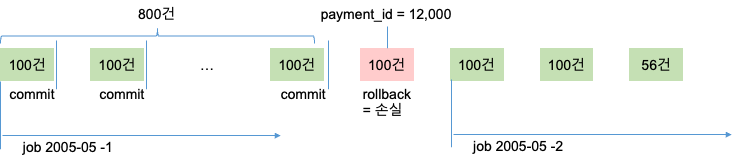
즉 2005-05라는 JobParameters를 이용해서 Job이 시작해서 8개의 Chunk를 처리하고 9번째 Chunk를 처리하는 과정에서 예외가 발생한 상황이다. 이때 읽은 개수는 900개를 다 읽었지만 처리 과정에서 문제가 발생했다. 따라서 다음에 읽을 것은 901번째 이다.
예외 상황이므로 Transaction은 rollback 될꺼고 801번째부터 900번까지의 데이터는 손실된다. 다시 데이터를 읽으면 901번부터 처리 되므로 결국 중간의 100건은 손실된다.
이 오류를 어떻게 처리하는 것이 좋을까?
가장 간단한 방법은 기존에 처리되었던 배치 작업을 싹다 지우고 새롭게 시작하면 된다. 데이터가 적다면 가장 효율적인 방법이다. 하지만 처리한 데이터의 건수가 정말 많았다면 기존에 성공한 작업 이후 부터 다시 시작하는 것이 효율적이다.
대책 수립
데이터 조회 쿼리 수정
일단 기존 데이터 조회 쿼리 부터 변경이 필요하다. 기존의 쿼리는 언제나 처음부터 읽어오기 때문에 중간부터 작업하는것이 불가능하다. 데이터를 읽어오는 기점을 설정해주자.
# 기존
SELECT payment_id, customer_id, staff_id,
       rental_id, amount, payment_date,
       last_update
FROM payment
WHERE
    DATE_FORMAT(payment_date, '%Y-%m')=#{yearMonth}

ORDER BY payment_id ASC
# 변경
SELECT payment_id, customer_id, staff_id,
rental_id, amount, payment_date,
last_update
FROM payment
WHERE
DATE_FORMAT(payment_date, '%Y-%m')=#{yearMonth}
AND payment_id > #{lastId} -- ID 기반 조회
ORDER BY payment_id ASC
ItemReader 수정
쿼리를 실행하기 위해서는 기존에 JobParameters로 부터 받아서 사용한 yearMonth외에 lastId가 필요하다. 이 값은 StepExecution을 통해서 전달할 계획이기 때문에 stepExecutionContext(Map)을 @Value로 주입 받아서 사용하자. 또한 성공/실패에 대한 상태를 직접 관리해야 하므로 상태 저장을 비활성화 한다.
@Bean
@StepScope
MyBatisCursorItemReader<Payment> paymentIdBaseReader(
        @Qualifier("sakilaSqlSessionFactory") SqlSessionFactory sqlSessionFactory,
        @Value("#{jobParameters['yearMonth']}") String yearMonth,
        @Value("#{stepExecutionContext['lastId'] ?: 0}") Long lastId
    ) {
    log.debug("▶ paymentIdBaseReader 검색 시작 ID: " + lastId);
    return new MyBatisCursorItemReaderBuilder<Payment>()
            .sqlSessionFactory(sqlSessionFactory)
            .queryId("com.quietjun.batch.model.mapper.SakilaMapper.selectPaymentsAfterId")
            .parameterValues(Map.of("yearMonth", yearMonth, "lastId", lastId))
            .saveState(false) // 상태 저장 비활성화
            .build();
}
ItemWriteListener 추가
Item이 저장되는 시점에 StepExecution의 context에 lastId를 저장해주도록 하자. ItemWriterListener는 Item을 저장 시점에 끼어들 수 있는 Listener로 afterWriter()를 재정의하면 성공적으로 데이터를 입력한 시점에 부가적인 작업을 할 수 있다.
ItemWriterListener를 구현하면서 StepExecution을 SPEL로 주입 받아서 사용하자.(StepExecutionContext를 사용하는데 이 객체를 SPEL로 주입 받으면 unmodifiable map 형태이므로 편집할 수가 없다.)
@Bean
@StepScope
ItemWriteListener<Payment> writeListener() {
    return new ItemWriteListener<Payment>() {
        @Value("#{stepExecution}")
        private StepExecution stepExecution;

        @Override
        public void afterWrite(Chunk<? extends Payment> items) {
            // Write가 성공한 후에만 마지막 성공 ID 업데이트
            log.debug("✅ 아이템 저장 성공 : {} " , items.size());
            long lastId = items.getItems().get(items.getItems().size() - 1).getPaymentId();
            // StepExecution의 ExecutionContext에 마지막 성공 ID 저장
            ExecutionContext executionContext = stepExecution.getExecutionContext();
            executionContext.putLong("lastId", lastId);
        }
    };
}
다음으로는 Step 구성 시 listener를 통해 ItemWriteListener를 추가해주면 된다.
@Bean
Step backupPaymentFailStep(
        JobRepository jobRepository,
        @Qualifier("quietjunTransactionManager") PlatformTransactionManager transactionManager,
        @Qualifier("paymentIdBaseReader") MyBatisCursorItemReader<Payment> reader,
        @Qualifier("paymentFailProcessor") ItemProcessor<Payment, Payment> processor,
        MyBatisBatchItemWriter<Payment> writer,
        ItemWriteListener<Payment> paymentItemStream) {

    return new StepBuilder("backupPaymentStep", jobRepository)
            .<Payment, Payment>chunk(CHUNK_SIZE)
            .transactionManager(transactionManager)
            .reader(reader)
            .processor(processor)
            .writer(writer)
            .listener(writeListener()) // Write 성공 시에만 상태 업데이트
            .build();
}
동작 확인
▶ paymentIdBaseReader 검색 시작 ID: 0
HikariPool-2 - Starting...
HikariPool-2 - Added connection com.mysql.cj.jdbc.ConnectionImpl@a4e14ed
HikariPool-2 - Start completed.
HikariPool-3 - Starting...
Added connection com.mysql.cj.jdbc.ConnectionImpl@1943e0ca
HikariPool-3 - Start completed.
✅ 아이템 저장 성공 : 100
✅ 아이템 저장 성공 : 100
✅ 아이템 저장 성공 : 100
✅ 아이템 저장 성공 : 100
✅ 아이템 저장 성공 : 100
✅ 아이템 저장 성공 : 100
✅ 아이템 저장 성공 : 100
✅ 아이템 저장 성공 : 100
Processing paymentId: 12000 failed., 남은 fail 회수: 2
Rolling back chunk transaction
Encountered an error executing step backupPaymentStep in job paymentBackupFailJob

Step: [backupPaymentStep] executed in 178ms
Job: [SimpleJob: [name=paymentBackupFailJob]] completed with the following parameters: [{JobParameter{name='yearMonth', value=2005-05, type=class java.lang.String, identifying=true}}] and the following status: [FAILED] in 191ms
Job: [SimpleJob: [name=paymentBackupFailJob]] launched with the following parameters: [{JobParameter{name='yearMonth', value=2005-05, type=class java.lang.String, identifying=true}}]
Executing step: [backupPaymentStep]

▶ paymentIdBaseReader 검색 시작 ID: 10876
Processing paymentId: 12000 failed., 남은 fail 회수: 1
Rolling back chunk transaction
Encountered an error executing step backupPaymentStep in job paymentBackupFailJob

Step: [backupPaymentStep] executed in 16ms
Job: [SimpleJob: [name=paymentBackupFailJob]] completed with the following parameters: [{JobParameter{name='yearMonth', value=2005-05, type=class java.lang.String, identifying=true}}] and the following status: [FAILED] in 42ms
Job: [SimpleJob: [name=paymentBackupFailJob]] launched with the following parameters: [{JobParameter{name='yearMonth', value=2005-05, type=class java.lang.String, identifying=true}}]
Executing step: [backupPaymentStep]

▶ paymentIdBaseReader 검색 시작 ID: 10876
Processing paymentId: 12000 failed., 남은 fail 회수: 0
Rolling back chunk transaction
Encountered an error executing step backupPaymentStep in job paymentBackupFailJob

Step: [backupPaymentStep] executed in 17ms
Job: [SimpleJob: [name=paymentBackupFailJob]] completed with the following parameters: [{JobParameter{name='yearMonth', value=2005-05, type=class java.lang.String, identifying=true}}] and the following status: [FAILED] in 39ms
Job: [SimpleJob: [name=paymentBackupFailJob]] launched with the following parameters: [{JobParameter{name='yearMonth', value=2005-05, type=class java.lang.String, identifying=true}}]
Executing step: [backupPaymentStep]

▶ paymentIdBaseReader 검색 시작 ID: 10876
✅ 아이템 저장 성공 : 100
✅ 아이템 저장 성공 : 100
✅ 아이템 저장 성공 : 100
아이템 저장 성공 : 56

Step: [backupPaymentStep] executed in 78ms
Executing step: [reportStep]

========================================
Payment 백업 배치 완료!
========================================
대상 월: 2005-05
읽은 건수: 356건
저장 건수: 356건
백업 확인: 1156건
제외 건수: 0건 (paymentId null 또는 처리 실패)
========================================'Spring Batch' 카테고리의 다른 글
| 10. RestApi Batch (0) | 2026.01.10 |
|---|---|
| 09. Backup Batch - 5 (0) | 2026.01.09 |
| 07. Backup Batch - 3 (0) | 2026.01.07 |
| 06. Backup Batch - 2 (0) | 2026.01.06 |
| 05. Backup Batch - 1 (0) | 2026.01.05 |
Contents
소중한 공감 감사합니다