cloud/Google-Cloud
GCP 3-Tier 구축 4
- -
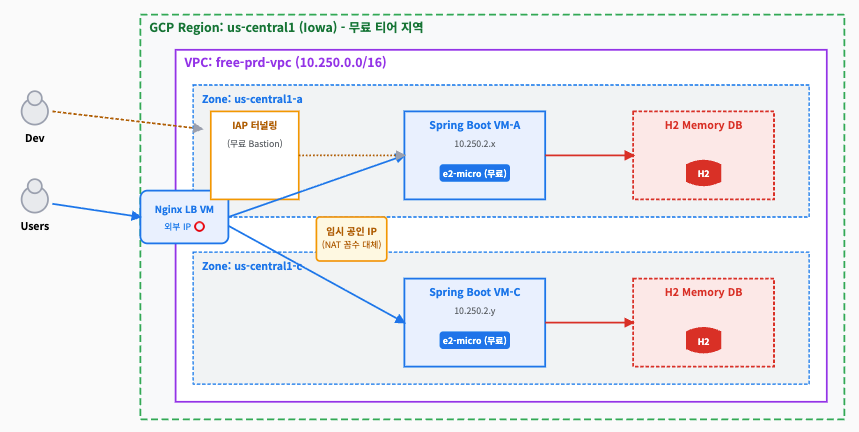
이번 포스트에서는 1st-Tier와 2nd-Tier를 연동시켜 보자.
로드밸런싱 연동 및 테스트
NginX 프론트엔드 랜딩 페이지 배포
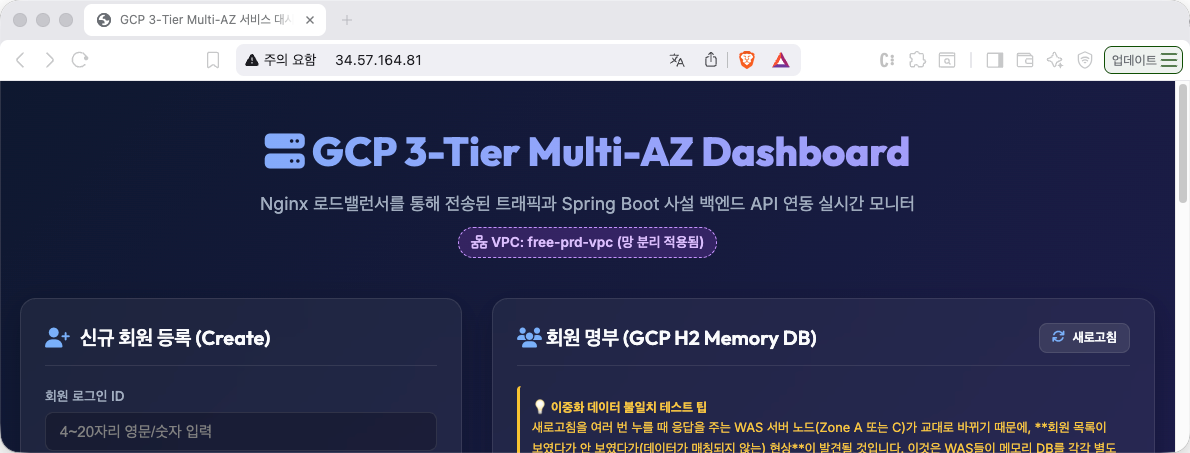
NginX는 최초 클라이언트의 요청을 받아 정적 서비스를 제공한다. 통상 여기에는 vue application이 들어가면 좋겠다. 여기서는 간단히 index.html을 만들어서 서비스해보자. /var/www/html/index.html을 원하는 내용으로 변경해주면 된다.
그런데 index.html 파일은 크기가 크기 때문에(약 24KB) 직접 nano 창에 복사-붙여넣기를 실행하면 웹 브라우저 터미널 버퍼 한계로 창이 먹통이 되어 뻗을 수 있다. 따라서 구글 콘솔의 [파일 업로드] 기능을 사용해 전송하는 것을 강력히 권장한다.
- 웹 SSH 파일 업로드 진행
구글 클라우드 콘솔의 VM SSH 브라우저 창의 우측 상단 ⚙️(톱니바퀴) 또는 도구 모음에서 [파일 업로드]를 선택하고, 로컬의 index.html 파일을 선택하여 업로드한다.
- 파일은 VM의 홈 디렉토리(~/index.html)에 업로드된다. - Nginx 웹 기본 경로로 파일 복사
VM 터미널 창에서 아래 명령어를 실행하여 업로드된 파일을 Nginx 서빙 경로로 덮어쓰기 복사한다.
sudo cp ~/index.html /var/www/html/index.html더보기
더보기
<!DOCTYPE html>
<html lang="ko">
<head>
<meta charset="UTF-8">
<meta name="viewport" content="width=device-width, initial-scale=1.0">
<title>GCP 3-Tier Multi-AZ 서비스 대시보드</title>
<!-- Google Fonts -->
<link rel="preconnect" href="https://fonts.googleapis.com">
<link rel="preconnect" href="https://fonts.gstatic.com" crossorigin>
<link href="https://fonts.googleapis.com/css2?family=Inter:wght@300;400;500;600;700&family=Outfit:wght@400;600;800&display=swap" rel="stylesheet">
<!-- Font Awesome (Icons) -->
<link rel="stylesheet" href="https://cdnjs.cloudflare.com/ajax/libs/font-awesome/6.4.0/css/all.min.css">
<style>
:root {
--primary: #1a73e8;
--primary-dark: #1557b0;
--primary-light: #e8f0fe;
--success: #34a853;
--warning: #fbbc04;
--danger: #d93025;
--bg-gradient: linear-gradient(135deg, #0f172a 0%, #1e1b4b 100%);
--card-bg: rgba(255, 255, 255, 0.04);
--card-border: rgba(255, 255, 255, 0.08);
--text-main: #f8fafc;
--text-muted: #94a3b8;
}
* {
box-sizing: border-box;
margin: 0;
padding: 0;
}
body {
font-family: 'Inter', sans-serif;
background: var(--bg-gradient);
color: var(--text-main);
min-height: 100vh;
padding: 40px 20px;
line-height: 1.5;
}
h1, h2, h3 {
font-family: 'Outfit', sans-serif;
font-weight: 600;
}
.container {
max-width: 1200px;
margin: 0 auto;
}
/* Header Style */
header {
text-align: center;
margin-bottom: 40px;
position: relative;
}
header h1 {
font-size: 2.5rem;
background: linear-gradient(90deg, #60a5fa 0%, #a78bfa 100%);
-webkit-background-clip: text;
background-clip: text;
-webkit-text-fill-color: transparent;
margin-bottom: 10px;
font-weight: 800;
}
header p {
color: var(--text-muted);
font-size: 1.1rem;
}
.badge-vpc {
display: inline-block;
background: rgba(147, 52, 230, 0.2);
color: #d8b4fe;
border: 1px dashed #c084fc;
padding: 4px 12px;
border-radius: 9999px;
font-size: 0.85rem;
margin-top: 10px;
font-weight: 600;
}
/* Grid Layout */
.grid {
display: grid;
grid-template-columns: 1fr;
gap: 30px;
}
@media (min-width: 900px) {
.grid {
grid-template-columns: 2fr 3fr;
}
}
/* Card System */
.card {
background: var(--card-bg);
border: 1px solid var(--card-border);
border-radius: 16px;
padding: 24px;
backdrop-filter: blur(16px);
box-shadow: 0 10px 30px rgba(0, 0, 0, 0.2);
transition: transform 0.3s ease, box-shadow 0.3s ease;
}
.card:hover {
transform: translateY(-2px);
box-shadow: 0 15px 35px rgba(0, 0, 0, 0.3);
}
.card-title {
font-size: 1.25rem;
margin-bottom: 20px;
display: flex;
align-items: center;
gap: 10px;
border-bottom: 1px solid var(--card-border);
padding-bottom: 12px;
}
.card-title i {
color: #60a5fa;
}
/* Forms */
.form-group {
margin-bottom: 16px;
}
.form-group label {
display: block;
font-size: 0.85rem;
color: var(--text-muted);
margin-bottom: 6px;
font-weight: 500;
}
.form-control {
width: 100%;
background: rgba(0, 0, 0, 0.2);
border: 1px solid var(--card-border);
border-radius: 8px;
padding: 10px 14px;
color: var(--text-main);
font-size: 0.95rem;
transition: border-color 0.2s;
}
.form-control:focus {
outline: none;
border-color: var(--primary);
box-shadow: 0 0 0 3px rgba(26, 115, 232, 0.25);
}
/* Buttons */
.btn {
display: inline-flex;
align-items: center;
justify-content: center;
gap: 8px;
padding: 10px 20px;
border-radius: 8px;
font-weight: 600;
font-size: 0.95rem;
cursor: pointer;
transition: all 0.2s ease;
border: none;
}
.btn-primary {
background: var(--primary);
color: white;
}
.btn-primary:hover {
background: var(--primary-dark);
}
.btn-danger {
background: rgba(217, 48, 37, 0.15);
color: #fca5a5;
border: 1px solid rgba(217, 48, 37, 0.3);
}
.btn-danger:hover {
background: var(--danger);
color: white;
}
.btn-secondary {
background: rgba(255, 255, 255, 0.08);
color: var(--text-main);
border: 1px solid var(--card-border);
}
.btn-secondary:hover {
background: rgba(255, 255, 255, 0.15);
}
/* Member List & Table */
.table-container {
overflow-x: auto;
}
table {
width: 100%;
border-collapse: collapse;
text-align: left;
}
th {
font-size: 0.85rem;
color: var(--text-muted);
font-weight: 600;
padding: 12px;
border-bottom: 2px solid var(--card-border);
}
td {
padding: 14px 12px;
border-bottom: 1px solid var(--card-border);
font-size: 0.95rem;
}
tr:hover td {
background: rgba(255, 255, 255, 0.02);
}
.actions {
display: flex;
gap: 8px;
}
.empty-state {
text-align: center;
padding: 40px 20px;
color: var(--text-muted);
}
.empty-state i {
font-size: 2.5rem;
margin-bottom: 12px;
opacity: 0.5;
}
/* Diagnostics & Monitoring Panel */
.monitor-panel {
background: rgba(0, 0, 0, 0.3);
border: 1px solid var(--card-border);
border-radius: 12px;
padding: 16px;
font-family: monospace;
font-size: 0.85rem;
max-height: 250px;
overflow-y: auto;
margin-top: 15px;
border-left: 4px solid var(--warning);
}
.log-entry {
margin-bottom: 6px;
line-height: 1.6;
}
.log-entry.info { color: #60a5fa; }
.log-entry.success { color: #34a853; }
.log-entry.error { color: #f87171; }
.log-entry.warning { color: #fbbf24; }
.stat-grid {
display: grid;
grid-template-columns: repeat(2, 1fr);
gap: 15px;
margin-bottom: 20px;
}
.stat-card {
background: rgba(255, 255, 255, 0.02);
border: 1px solid var(--card-border);
border-radius: 8px;
padding: 12px;
text-align: center;
}
.stat-val {
font-size: 1.5rem;
font-weight: 700;
color: #38bdf8;
margin-top: 4px;
}
/* Modal Settings */
.modal {
display: none;
position: fixed;
top: 0;
left: 0;
width: 100%;
height: 100%;
background: rgba(0, 0, 0, 0.7);
backdrop-filter: blur(4px);
align-items: center;
justify-content: center;
z-index: 1000;
padding: 20px;
}
.modal.active {
display: flex;
}
.modal-content {
background: #1e1b4b;
border: 1px solid rgba(255, 255, 255, 0.1);
border-radius: 16px;
padding: 24px;
width: 100%;
max-width: 450px;
position: relative;
}
.modal-header {
font-size: 1.25rem;
margin-bottom: 20px;
font-weight: 700;
}
.modal-footer {
margin-top: 24px;
display: flex;
justify-content: flex-end;
gap: 10px;
}
</style>
</head>
<body>
<div class="container">
<header>
<h1><i class="fa-solid fa-server"></i> GCP 3-Tier Multi-AZ Dashboard</h1>
<p>Nginx 로드밸런서를 통해 전송된 트래픽과 Spring Boot 사설 백엔드 API 연동 실시간 모니터</p>
<span class="badge-vpc"><i class="fa-solid fa-network-wired"></i> VPC: free-prd-vpc (망 분리 적용됨)</span>
</header>
<div class="grid">
<!-- Left: Form Card -->
<div class="card">
<h2 class="card-title"><i class="fa-solid fa-user-plus"></i> 신규 회원 등록 (Create)</h2>
<form id="createForm" onsubmit="event.preventDefault(); handleCreate();">
<div class="form-group">
<label for="memberId">회원 로그인 ID</label>
<input type="text" id="memberId" class="form-control" placeholder="4~20자리 영문/숫자 입력" minlength="4" maxlength="20" required>
</div>
<div class="form-group">
<label for="memberName">이름 (Name)</label>
<input type="text" id="memberName" class="form-control" placeholder="회원 실명 입력" maxlength="50" required>
</div>
<div class="form-group">
<label for="memberPassword">비밀번호</label>
<input type="password" id="memberPassword" class="form-control" placeholder="최소 6자리 입력" minlength="6" required>
</div>
<button type="submit" class="btn btn-primary" style="width: 100%; margin-top: 10px;">
<i class="fa-solid fa-cloud-arrow-up"></i> GCP WAS에 등록 전송
</button>
</form>
<h2 class="card-title" style="margin-top: 40px;"><i class="fa-solid fa-gauge-high"></i> 로드밸런싱 검증 툴</h2>
<div class="stat-grid">
<div class="stat-card">
<div style="font-size: 0.8rem; color: var(--text-muted);">총 API 요청 횟수</div>
<div id="statTotal" class="stat-val">0</div>
</div>
<div class="stat-card">
<div style="font-size: 0.8rem; color: var(--text-muted);">연결 상태</div>
<div id="statStatus" class="stat-val" style="color: #34a853;">READY</div>
</div>
</div>
<button onclick="triggerLoadBalancingTest()" class="btn btn-secondary" style="width: 100%;">
<i class="fa-solid fa-bolt"></i> 5회 고속 API 호출 (분산 검증)
</button>
<div id="consoleLogs" class="monitor-panel">
<div class="log-entry info">[INFO] 모니터링 콘솔이 활성화되었습니다. API를 찔러 로드밸런싱을 관찰해 보세요.</div>
</div>
</div>
<!-- Right: List Card -->
<div class="card">
<h2 class="card-title" style="justify-content: space-between;">
<span><i class="fa-solid fa-users"></i> 회원 명부 (GCP H2 Memory DB)</span>
<button onclick="loadMembers()" class="btn btn-secondary" style="padding: 6px 12px; font-size: 0.8rem;">
<i class="fa-solid fa-arrows-rotate"></i> 새로고침
</button>
</h2>
<div class="concept-box" style="background: rgba(24bbc4, 0.05); border-left: 3px solid var(--warning); padding: 12px; font-size: 0.8rem; line-height: 1.6; color: #fbbf24; margin-bottom: 20px; border-radius: 4px;">
<strong>💡 이중화 데이터 불일치 테스트 팁</strong><br>
새로고침을 여러 번 누를 때 응답을 주는 WAS 서버 노드(Zone A 또는 C)가 교대로 바뀌기 때문에, **회원 목록이 보였다가 안 보였다가(데이터가 매칭되지 않는) 현상**이 발견될 것입니다.
이것은 WAS들이 메모리 DB를 각각 별도로 갖고 있기 때문이며, Nginx의 로드밸런싱이 멀티 영역에 걸쳐 물리적으로 완벽하게 분산되고 있음을 뜻하는 증거입니다!
</div>
<div class="table-container">
<table id="memberTable">
<thead>
<tr>
<th>로그인 ID</th>
<th>이름</th>
<th style="text-align: right;">작업</th>
</tr>
</thead>
<tbody id="memberList">
<!-- Dynamic content loaded here -->
</tbody>
</table>
<div id="emptyState" class="empty-state">
<i class="fa-solid fa-database"></i>
<p>현재 조회된 회원이 없습니다.<br>목록 새로고침을 누르거나 회원 가입을 진행하세요.</p>
</div>
</div>
</div>
</div>
</div>
<!-- Edit Modal -->
<div id="editModal" class="modal">
<div class="modal-content">
<h2 class="modal-header"><i class="fa-solid fa-user-pen"></i> 회원 정보 수정</h2>
<form id="editForm" onsubmit="event.preventDefault(); handleUpdateSubmit();">
<input type="hidden" id="editOriginalId">
<div class="form-group">
<label for="editMemberId">회원 ID (수정 불가)</label>
<input type="text" id="editMemberId" class="form-control" disabled>
</div>
<div class="form-group">
<label for="editMemberName">이름 (Name)</label>
<input type="text" id="editMemberName" class="form-control" required>
</div>
<div class="form-group">
<label for="editMemberPassword">비밀번호 확인/수정</label>
<input type="password" id="editMemberPassword" class="form-control" placeholder="수정 시 비밀번호 입력 필수" minlength="6" required>
</div>
<div class="modal-footer">
<button type="button" class="btn btn-secondary" onclick="closeEditModal()">취소</button>
<button type="submit" class="btn btn-primary">수정사항 저장</button>
</div>
</form>
</div>
</div>
<script>
// Config: API Base URL
// Nginx가 프록시해주기 때문에 동일 도메인의 '/api' 상대 경로를 사용해야 CORS 에러가 없습니다.
const API_BASE = '/api/members';
const HELLO_API = '/api/hello';
let requestCount = 0;
function addConsoleLog(message, type = 'info') {
const consoleEl = document.getElementById('consoleLogs');
const entry = document.createElement('div');
entry.className = `log-entry ${type}`;
const time = new Date().toLocaleTimeString();
entry.innerHTML = `[${time}] ${message}`;
consoleEl.appendChild(entry);
consoleEl.scrollTop = consoleEl.scrollHeight;
}
// CREATE: Member
async function handleCreate() {
const id = document.getElementById('memberId').value;
const name = document.getElementById('memberName').value;
const password = document.getElementById('memberPassword').value;
addConsoleLog(`회원가입 요청 시도: ID=${id}, Name=${name}`, 'info');
requestCount++;
document.getElementById('statTotal').innerText = requestCount;
try {
const response = await fetch(API_BASE, {
method: 'POST',
headers: { 'Content-Type': 'application/json' },
body: JSON.stringify({ id, password, name })
});
if (response.status === 201) {
const data = await response.json();
addConsoleLog(`회원 등록 성공: ${data.name} (${data.id})`, 'success');
document.getElementById('createForm').reset();
loadMembers();
} else {
const errMsg = await response.text();
addConsoleLog(`등록 실패: ${errMsg || response.statusText}`, 'error');
alert(`등록 실패: ${errMsg}`);
}
} catch (error) {
addConsoleLog(`네트워크 에러: ${error.message}`, 'error');
alert(`API 서버 통신에 실패했습니다: ${error.message}`);
}
}
// READ: Load Member List
async function loadMembers() {
addConsoleLog('회원 명부 조회 요청 (GET /api/members)', 'info');
requestCount++;
document.getElementById('statTotal').innerText = requestCount;
try {
const response = await fetch(API_BASE);
if (!response.ok) throw new Error(`HTTP Error: ${response.status}`);
const members = await response.json();
const tbody = document.getElementById('memberList');
const emptyState = document.getElementById('emptyState');
const table = document.getElementById('memberTable');
tbody.innerHTML = '';
if (members.length === 0) {
table.style.display = 'none';
emptyState.style.display = 'block';
addConsoleLog('회원 명부가 비어 있습니다. (H2 DB 상태 확인)', 'warning');
} else {
emptyState.style.display = 'none';
table.style.display = 'table';
members.forEach(member => {
const tr = document.createElement('tr');
tr.innerHTML = `
<td style="font-weight: 600; color: #60a5fa;">${member.id}</td>
<td>${member.name}</td>
<td style="text-align: right;">
<div class="actions" style="justify-content: flex-end;">
<button class="btn btn-secondary" style="padding: 6px 12px; font-size: 0.8rem;" onclick="openEditModal('${member.id}', '${member.name}')">
<i class="fa-solid fa-user-pen"></i> 수정
</button>
<button class="btn btn-danger" style="padding: 6px 12px; font-size: 0.8rem;" onclick="handleDelete('${member.id}')">
<i class="fa-solid fa-trash-can"></i> 삭제
</button>
</div>
</td>
`;
tbody.appendChild(tr);
});
addConsoleLog(`총 ${members.length}명의 회원 리스트 조회 완료`, 'success');
}
document.getElementById('statStatus').innerText = 'CONNECTED';
document.getElementById('statStatus').style.color = '#34a853';
} catch (error) {
addConsoleLog(`명부 로드 중 에러: ${error.message}`, 'error');
document.getElementById('statStatus').innerText = 'ERR_CONN';
document.getElementById('statStatus').style.color = '#d93025';
}
}
// UPDATE: Open Modal & Submit
function openEditModal(id, name) {
document.getElementById('editOriginalId').value = id;
document.getElementById('editMemberId').value = id;
document.getElementById('editMemberName').value = name;
document.getElementById('editMemberPassword').value = '';
document.getElementById('editModal').classList.add('active');
}
function closeEditModal() {
document.getElementById('editModal').classList.remove('active');
}
async function handleUpdateSubmit() {
const id = document.getElementById('editOriginalId').value;
const name = document.getElementById('editMemberName').value;
const password = document.getElementById('editMemberPassword').value;
addConsoleLog(`회원 수정 요청 시도: ID=${id}`, 'info');
requestCount++;
document.getElementById('statTotal').innerText = requestCount;
try {
const response = await fetch(`${API_BASE}/${id}`, {
method: 'PUT',
headers: { 'Content-Type': 'application/json' },
body: JSON.stringify({ id, password, name })
});
if (response.ok) {
const data = await response.json();
addConsoleLog(`회원 수정 성공: ${data.name} (${data.id})`, 'success');
closeEditModal();
loadMembers();
} else {
const errMsg = await response.text();
addConsoleLog(`수정 실패: ${errMsg || response.statusText}`, 'error');
alert(`수정 실패: ${errMsg}`);
}
} catch (error) {
addConsoleLog(`수정 네트워크 에러: ${error.message}`, 'error');
}
}
// DELETE: Member
async function handleDelete(id) {
if (!confirm(`아이디 [${id}] 회원을 정말로 삭제하시겠습니까?`)) return;
addConsoleLog(`회원 삭제 요청 시도: ID=${id}`, 'info');
requestCount++;
document.getElementById('statTotal').innerText = requestCount;
try {
const response = await fetch(`${API_BASE}/${id}`, {
method: 'DELETE'
});
if (response.status === 204) {
addConsoleLog(`회원 삭제 완료: ID=${id}`, 'success');
loadMembers();
} else {
const errMsg = await response.text();
addConsoleLog(`삭제 실패: ${errMsg}`, 'error');
alert(`삭제 실패: ${errMsg}`);
}
} catch (error) {
addConsoleLog(`삭제 네트워크 에러: ${error.message}`, 'error');
}
}
// LOAD BALANCING TEST: Trigger 5 concurrent requests
async function triggerLoadBalancingTest() {
addConsoleLog('🚀 로드밸런싱 실시간 검증 시작 (연속 5회 GET /api/hello)', 'warning');
for(let i = 1; i <= 5; i++) {
setTimeout(async () => {
requestCount++;
document.getElementById('statTotal').innerText = requestCount;
try {
const start = performance.now();
const response = await fetch(HELLO_API);
const duration = (performance.now() - start).toFixed(0);
if (response.ok) {
const data = await response.json();
// 스프링부트 hello 응답에서 메시지를 파싱하여 콘솔에 띄움
addConsoleLog(`[호출 ${i}] 응답 수신 (${duration}ms): <span style="color:#a78bfa;">${data.message}</span>`, 'success');
} else {
addConsoleLog(`[호출 ${i}] 서버 오류 (${response.status})`, 'error');
}
} catch (error) {
addConsoleLog(`[호출 ${i}] 연결 실패: ${error.message}`, 'error');
}
}, i * 250); // 250ms 간격으로 호출
}
}
// Initial Load
window.onload = function() {
loadMembers();
};
</script>
</body>
</html>
NginX 역방향 프록시(Reverse Proxy) 및 로드 밸런서 설정
다시 nginx-lb-vm에 접속해서 `/etc/nginx/sites-available/default` 파일을 수정한다.
sudo nano /etc/nginx/sites-available/default기존의 내용을 모두 지우고 다음 내용으로 대체한다.
# 1. 뒷단의 사설망 WAS VM 2대를 로드밸런싱 그룹으로 묶음
upstream backend_was {
    server 10.250.2.x:8080;  # free-was-a의 실제 내부(사설) IP 입력
    server 10.250.2.y:8080;  # free-was-c의 실제 내부(사설) IP 입력
}

server {
    listen 80 default_server;
    listen [::]:80 default_server;

    # Nginx가 서빙할 프론트엔드 정적 파일(대시보드 index.html) 경로
    root /var/www/html;
    index index.html index.htm;

    server_name _;

    # 루트(/) 접속 시 대시보드 서빙
    location / {
        try_files $uri $uri/ =404;
    }

    # /api/로 들어오는 모든 요청은 뒷단의 WAS 로드밸런싱 그룹으로 안전하게 포워딩 (리버스 프록시)
    location /api/ {
        proxy_pass http://backend_was;
        proxy_set_header Host $host;
        proxy_set_header X-Real-IP $remote_addr;
        proxy_set_header X-Forwarded-For $proxy_add_x_forwarded_for;
    }
}
다음으로 NginX 설정을 검증하고 서비스를 재시작하여 반영한다.
stgray22@nginx-lb-vm:~$ sudo nginx -t   # 설정 구문 에러 검증 (successful 문구 확인)
nginx: the configuration file /etc/nginx/nginx.conf syntax is ok
nginx: configuration file /etc/nginx/nginx.conf test is successful

stgray22@nginx-lb-vm:~$ sudo systemctl restart nginx
최종 아키텍쳐 동작 및 분산 검증
- 대시보드 접속 및 웹 CRUD 테스트
웹 브라우저를 열어 Nginx 웹 서버의 외부 공인 IP 주소(http://[NGINX_외부_IP])로 접속한다.
- 화면 왼쪽 폼에 회원 로그인 ID, 이름, 비밀번호를 입력하고 [GCP WAS에 등록 전송] 버튼을 누른다.
- 회원 등록이 정상 성공하며 콘솔 로그 패널에 성공 초록색 로그가 표시되는지 확인한다.
- 이중화 데이터 분리 직접 눈으로 목격하기 (꿀잼 포인트)
우측 회원 명부의 [새로고침] 버튼을 2~3초 간격으로 연속해서 클릭해 본다.
- 로드밸런서(Nginx)가 요청을 Zone A와 Zone C의 WAS 서버로 교대로 분산 포워딩한다.
- 이때, 각각의 WAS는 메모리(H2 DB)가 독립되어 있어 **회원 명부에 데이터가 보였다가 안 보였다가(데이터 불일치)** 하는 현상이 교대로 나타나야 정상이다. (VPC 격리 및 물리 분산이 완벽하다는 최고의 반증!)
- 실시간 로드밸런싱 분산 시뮬레이션
왼쪽 하단의 [5회 고속 API 호출] 버튼을 클릭한다.
- Nginx를 통해 5개의 API 트래픽이 연속해서 흘러가면서, spring-was 노드 A와 C가 번갈아가며 응답을 처리하고 그 분산 결과가 로그창에 실시간으로 기록되는 모습을 확인한다.
현재 상황
이번 단계에서는 1st-Tier와 2nd-Tier를 연동했고 LB가 잘 동작하는 것을 확인해 보았다.
H2-> MySql로 대체
네트워크 및 접속 설정
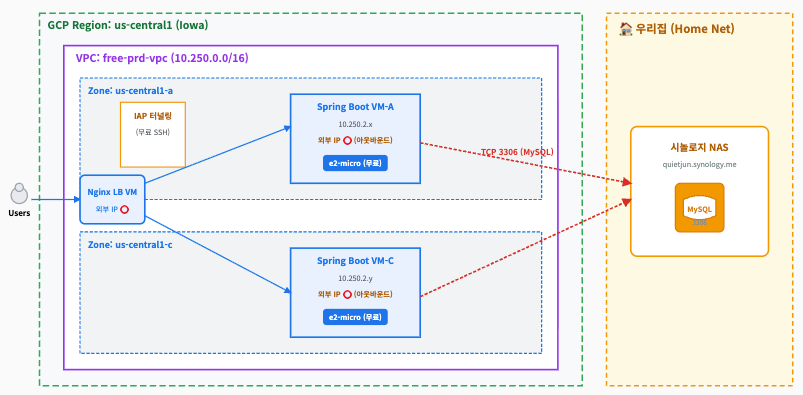
마지막으로 3rd-Tier에 해당하는 부분을 H2에서 NAS에서 운영되는 MySql로 변경해보자. 네트워크 적으로 해줄 일은 집 공유기 및 NAS에 방화벽 설정을 해주는 일이다.
- **포트포워딩(Port Forwarding)**: 외부 인터넷에서 집 공유기 IP의 TCP 3306 포트로 들어오는 요청을 시놀로지 NAS 내부 IP의 3306 포트로 토스하도록 설정한다.
- **DDNS 연결**: IP가 수시로 바뀌는 가정집 환경이므로, 시놀로지 DDNS(예: 아이디.synology.me)를 설정하여 고정 도메인을 확보한다.
- **DB 계정 권한**: MySQL에 접속하여 외부(GCP WAS)에서 접속할 수 있는 계정을 생성한다.
CREATE USER 'gcp_user'@'%' IDENTIFIED BY '비밀번호';
GRANT ALL PRIVILEGES ON *.* TO 'gcp_user'@'%';
FLUSH PRIVILEGES;
Sprig Boot application.properties 수정
기존의 H2관련 내용을 주석 처리하고 다음과 같이 설정해준다.
# 기존 H2 설정은 주석 처리
# spring.datasource.url=jdbc:h2:mem:testdb ...

# 시놀로지 NAS MySQL 연결 설정
spring.datasource.driver-class-name=com.mysql.cj.jdbc.Driver
spring.datasource.url=jdbc:mysql://[본인DDNS].synology.me:3306/[디비명]?useSSL=false&serverTimezone=Asia/Seoul
spring.datasource.username=quietjun
spring.datasource.password=비밀번호

# Hibernate DDL 자동 설정 (최초 실행 시 테이블 자동 생성)
spring.jpa.database-platform=org.hibernate.dialect.MySQLDialect
spring.jpa.hibernate.ddl-auto=update
그리고 다시 https://goodteacher.tistory.com/949에서의 배포 과정을 다시 거치면 3Tier가 완벽히 동작하게 된다.
서비스 중지
인스턴스 중지
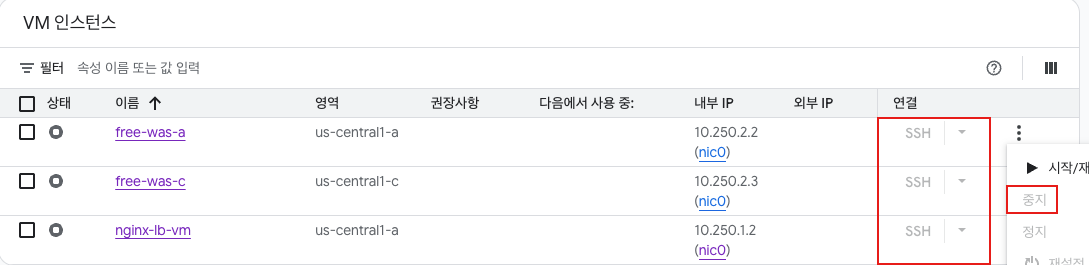
GCP를 사용하게 되면 VM 사용, IP 사용, 디스크 점유 등의 비용이 발생하게 된다. 따라서 단순히 테스트가 목표였다면 VPC를 완전히 삭제해줘야 안심이지만 다행히 GCP는 무료로 주는 것들이 좀 있어서 많이 사용하지 않는다면 VM인스턴스만 중지시켜두면 관찮다.
"계정당 매월 총 30GB의 표준 영구 디스크(HDD) 무료 제공"
'cloud > Google-Cloud' 카테고리의 다른 글
| GCP 3-Tier 구축 3 (0) | 2026.07.08 |
|---|---|
| GCP 3-Tier 구축 2 (0) | 2026.07.07 |
| GCP 3-Tier 구축 1 (0) | 2026.07.06 |
Contents
소중한 공감 감사합니다